.png)
Overview
Organizations with multiple provincial offices and/or requirements to invoice clients with billing addresses outside the province of operation will be working with multiple tax rules in order to satisfy input sales tax credit requirements as well as accurate calculations of sales taxes billed.
Using the concept of sales tax schemes and a supporting sales tax matrix which applies the organization's interpretation of place of supply rules, Acumin executes the calculation of the sales tax billed at a transactional level in consideration of the location of the billing entity coupled with the province of the billing address and the sales tax scheme applied at the entry code level.
In addition, the organization is able to process accurate input tax credits by taking advantage of the automatic calculation included with objects such as general payment requisitions and or AP vouchers.
Responsibility of Dexco
-
Ensuring that the tools included enable users to invoice their clients and process supplier invoices in accordance with place of supply rules.
Responsibility of The Organization
-
Understanding legislation as it applies to them;
-
Obtaining tax advice from professionals as needed, and;
-
Providing Dexco with confirmation of required sales tax vendor and client invoice policies in order for Dexco to establish the related tax rules and schemas for generating invoice documents and processing supplier invoices.
It is important for the organization to understand that it is the responsibility of the authorized user to interpret sales tax legislation and consequently apply the correct sales tax when invoicing clients or when paying suppliers. This means that the sales tax schemes and tax rules implemented along with the resulting outcome of the sales tax matrix is based on a submitted list of client-approved client and vendor invoice policies as well as a subsequently client-approved sales tax calculation matrix.
Relationship Between Objects:
-
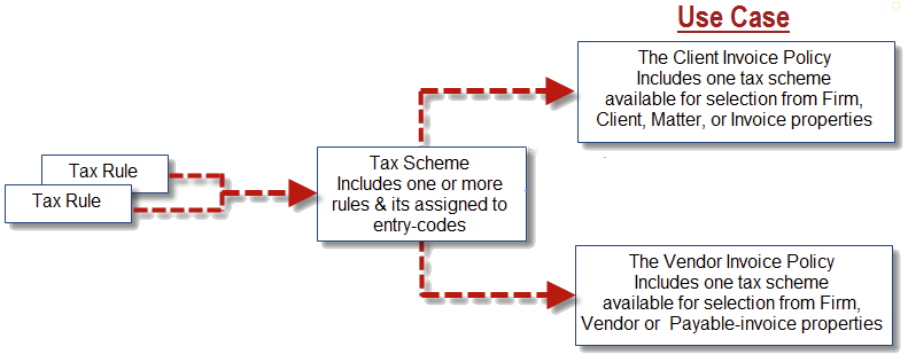
Sales-tax rules require an organization-defined label per language. Although the sales-tax rule rate can be modified by the organization, the label cannot therefore we recommend that it not include the rate. The restriction to the modification of the tax rule label was implemented to avoid business logic errors resulting from inconsistent permitted modifications to the tax rule rate;
-
The sales tax scheme object is used to associate one or more tax rules per taxation level and are at the core of the sales-tax calculation model. As sales tax schemes cannot be modified or created by the organization, their label can include the composition of rate rules and current rate structure;
-
The client or vendor invoice policy object is used to further define the sales tax scheme for ease of selection by the end-user therefore its label should reflect content and use-case. Client and or vendor invoice policies can be created and modified by the organization.
Sales Tax Paid
Background:
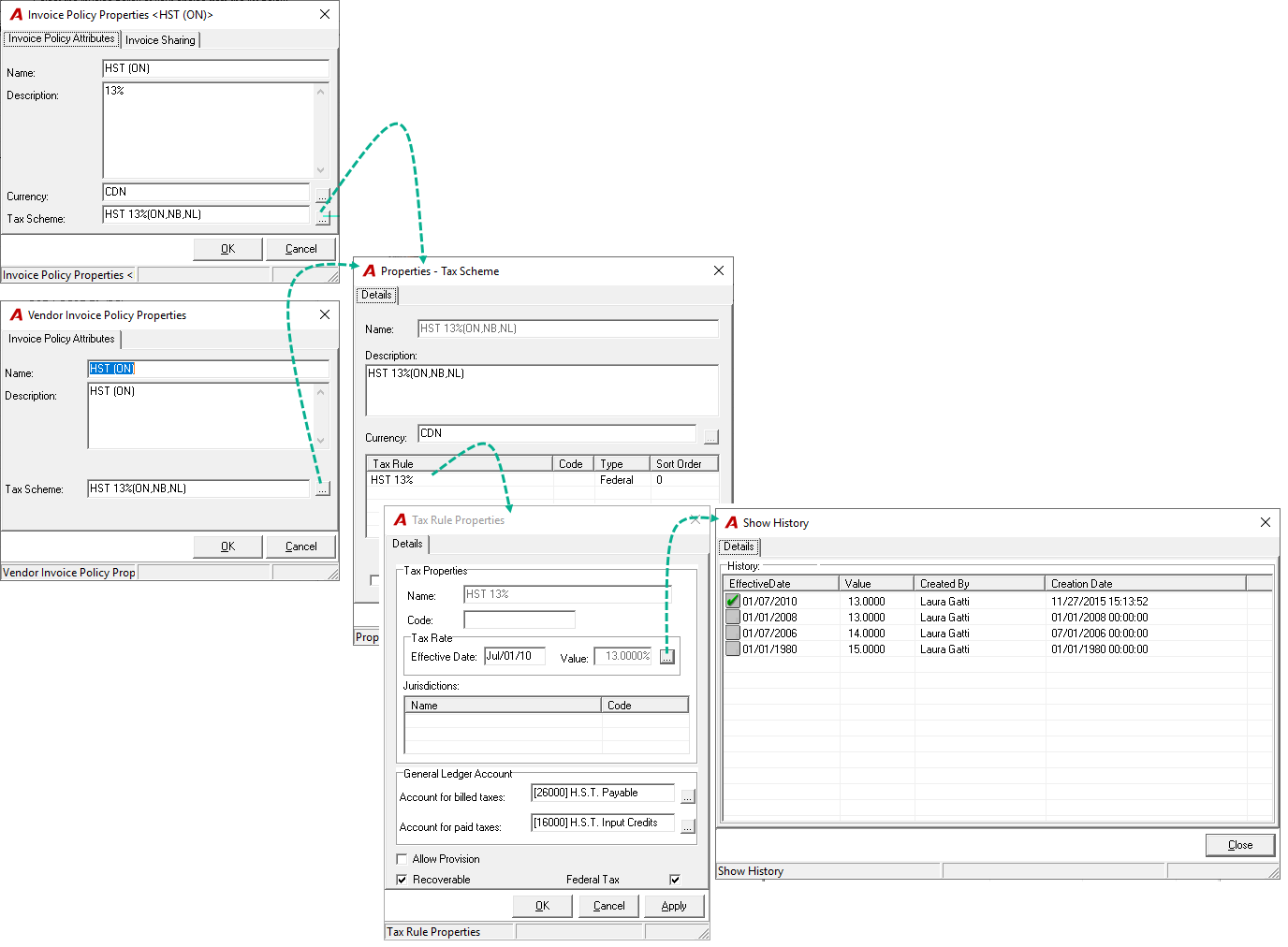
Acumin uses sales tax schemas - directly or indirectly and/or vendor invoice policies (pre-set in vendor properties) in order to calculate the sales taxes to be paid per supplier transaction processed through general payments, expense reports (subject to licensing), petty cash vouchers (subject to licensing) and/or accounts payable.
The vendor invoice policies are available for selection by users of the affected production processes; supplied to them in a relevant capacity when working with any of the payment related options listed above as well as when creating new vendors.
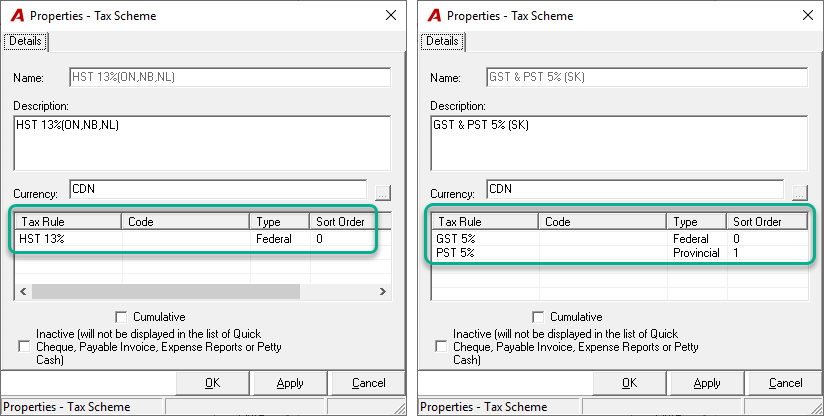
Note: A sales tax scheme is always the combination of one or more sales tax rules. For example the HST 13% sales tax scheme would contain a single tax rule of HST at 13%; whereas the GST 5% and PST 5% tax scheme would contain two tax rules, namely GST at 5% and PST at 5%.
Vendor Invoice Policies and Related Sales Tax Schemes:
The sales tax functionality as it applies to supplier invoices consists of the following:
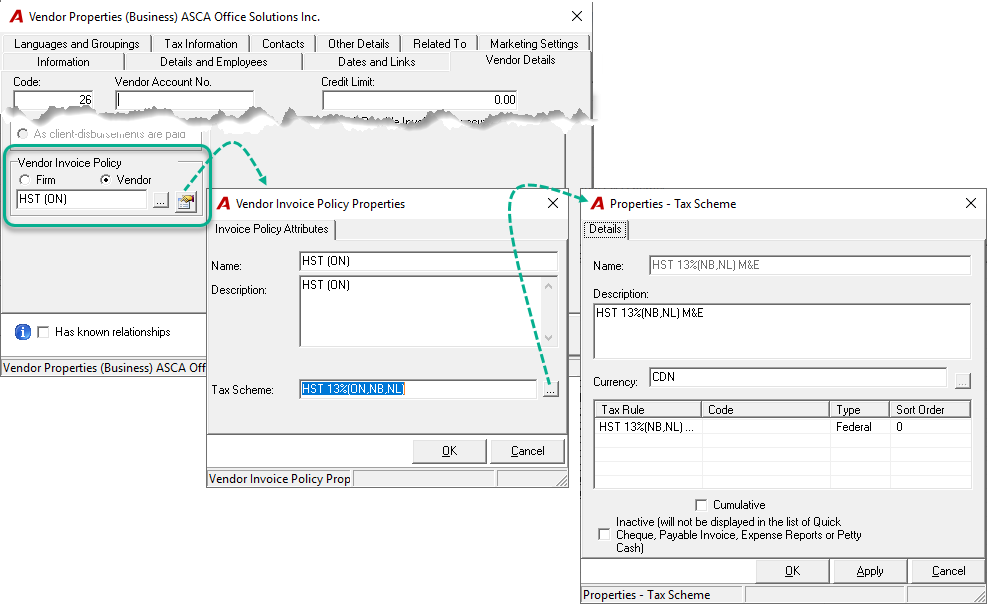
The vendor invoice policy is associated (linked) to vendors. It contains a tax scheme; therefore it associates a tax scheme and its related tax rules to the vendor and eventually the payable voucher or general payment form.
The business process for dealing with supplier invoices and payments requires that:
-
The user be able to process supplier invoices and requests for payments with various sales taxes as invoiced by the supplier;
-
The sales tax recoverable (if any) be accounted for by the system, and;
-
The sales tax paid be a reported on. All supporting reports must therefore balance to the accounted-for GL operations.
Vendor Invoice Policies - Meals and Entertainment:
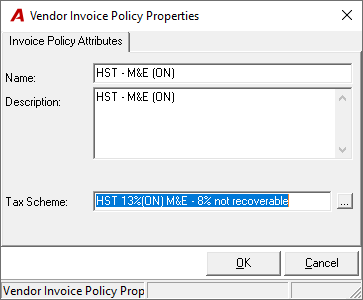
The sales tax paid on meals and entertainment is only partially recoverable. Organization's wishing to calculate the input tax credit automatically at a transactional level has implemented Vendor Invoice Policies with supporting sales tax schemes and sales tax rules which calculate the allowable ITC out of the total amount to be paid.
Sales Tax Billed
The sales tax functionality as it applies to invoicing clients must support a variety of scenarios that adds complexity when compared to sales-tax paid. In support of this added complexity and existing place of supply requirements we include a description of the variables involved in the sales tax billed functionality process.
Background, Context and Definitions:
Environment Captions:
In support of place of supply rules organizations with the enhanced sales tax license are subject to a calculated result for the most appropriate client invoice policy for the proposed invoice. Although the calculated result may be equal to the client invoice policy for the affected matter, this is not always the case as the enhanced license ensures that the proposed result takes into consideration the elements affecting place of supply decisions for that one situation. This calculation relies on environment-captions variables which need to be updated when there is a change in tax rules or schemes at a provincial level or federal level.
Note to reader: Although the requirement of the environment captions is not as visible for organizations without the enhanced sales tax license, they too need to be set-up and maintained as changes occur within the respective sales tax environment.
Tax Registration Number Labels:
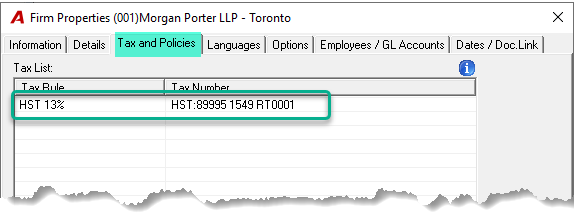
The tax registration numbers are entered and maintained by an authorized user within the firm's properties of the firm of the matter being billed. Once completed at implementation, any changes to tax rules or tax schemes for some or all of the billing firms should be assessed with respect to tax registration numbers and respective labelling in case modifications are required.
Modifications to tax registration numbers and/or respective labelling can be concluded on the "Tax and Policies" tab of firm properties of each firm affected within the organization's Acumin environment.
Unlike the standard invoice template engine, Organizations subject to the Custom Invoice Template Engine Model often have hard-coded labels requested at the time of implementation; becoming obsolete when environment changes occur. Organizations subject to the custom engine should take into consideration the potential resulting costs when considering changes to the sales tax structure.
The Sales Tax Structure:
Acumin's sales tax structure ensures that the billing object is limited to one tax rule per taxation level. In other words, the application controls the creation of a tax scheme so that compositions without applicable business logic are not created in error (i.e. a sales tax scheme that combines two federal taxes – HST and GST).
Organizations subject to the enhanced billing options – invoice sharing license have the option to create shared (split) invoices. In this case, if the participants have different sales tax requirements (i.e.: HST for one, GST and PST for another etc.) the end result will be a combined sales tax which is presented in table format on the invoice document.
The client invoice policy:
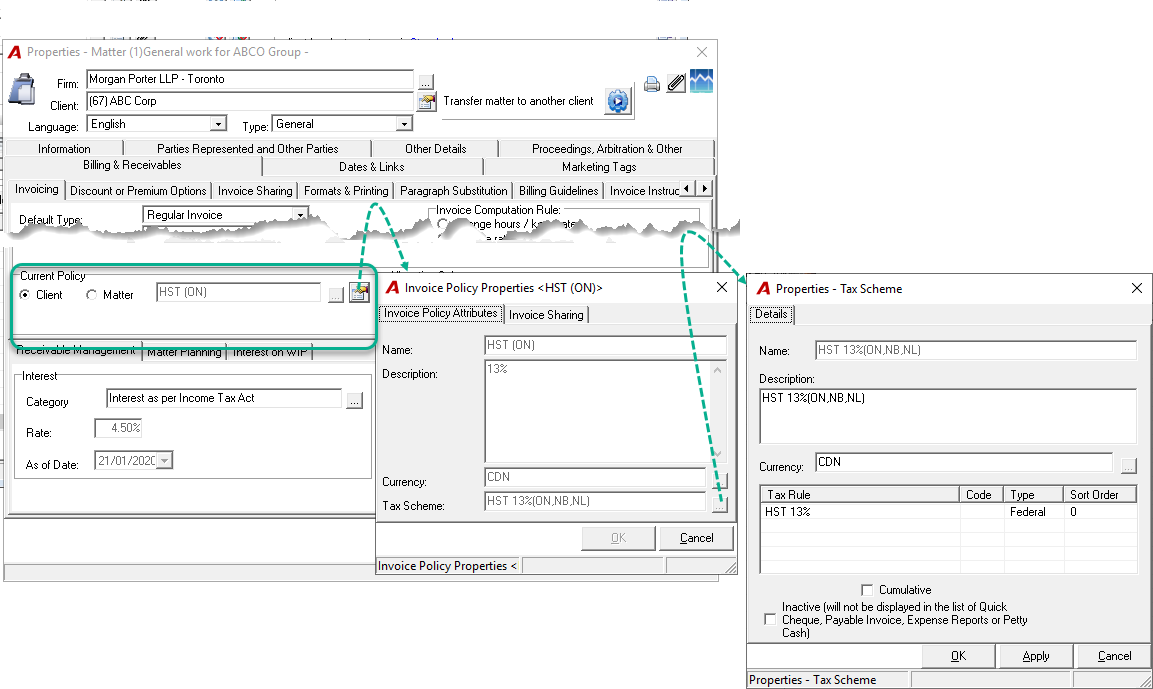
The client invoice policy is associated (linked) to clients, matters and invoices. It contains a tax scheme; therefore it associates a tax scheme and its related tax rules to the client, matter and eventually to the invoice where the actual sales tax billed is calculated for each affected entry included in the invoice.
The Entry Code Tax Scheme:
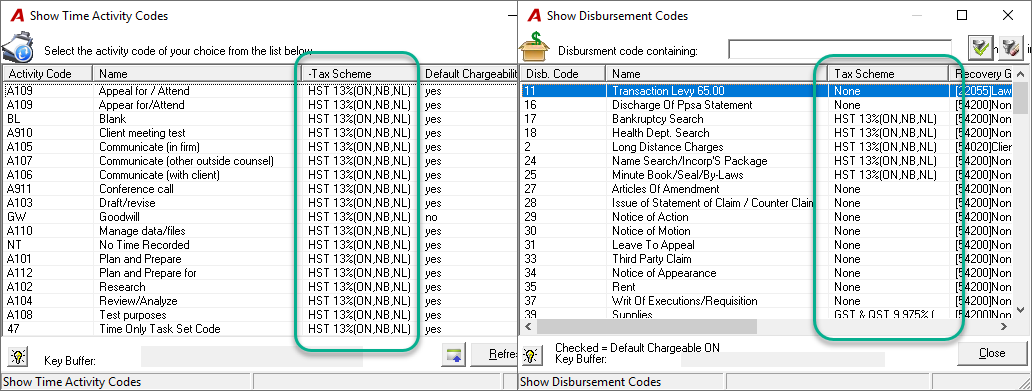
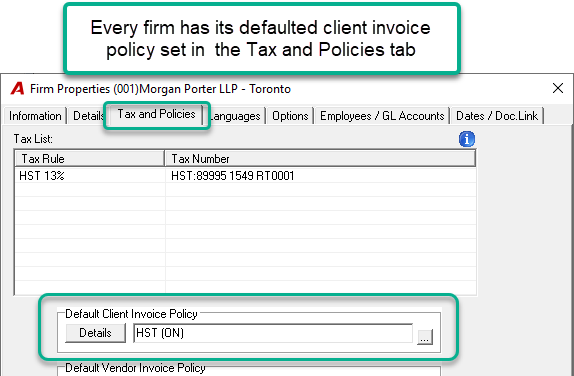
In order to reference back to the taxability of the billing entity or the type of work being billed, Acumin requires that a tax scheme be associated to each time and disbursement code. The tax scheme selected for affected taxable time and disbursement codes must be in relation to the taxability of the billing entity and the default client invoice policy for the main firm (firm 001)
The Sales Tax Matrix:
The sales tax matrix is a Dexco-calculated and client-configured taxability result table, whereby each taxability outcome (GST 5% & PST 5%, HST 13% etc.) is the result of combined taxability factors (billing-entity (firm), client billing-address, place of supply rules etc.); is then applied to individual time and disbursement entries included in the invoice being prepared, in order to calculate the total sales tax billed for the affected invoice.
The latter is applied to individual time and disbursement entries:
-
At point of invoicing; where the sales tax matrix combines the sales tax scheme applied at the invoice level with the sales tax scheme of the applicable entry code providing a resulting tax scheme which is then applied to the affected entry transactions, or;
-
On reporting; unbilled time and disbursement entries in consideration of sales tax to be billed. In this case the sales tax matrix combines the sales tax scheme applied at the matter level with the sales tax scheme of the applicable entry code providing a resulting tax scheme which is then applied to affected entry transaction.
When a matter or an invoice is created, the latter is assigned a client invoice policy with its associated tax scheme. The matter or the invoice (pre-bill) also contains time and disbursement entries – each associated with an entry code that also has a tax scheme. When calculating the sales tax amount of the unbilled entries or the un-posted invoice (pre-bill), the application looks at the sales tax matrix to identify the sales tax combination result to apply at the entry level thus supporting accurately calculated sales tax even on shared (split) invoices across different taxability jurisdictions.
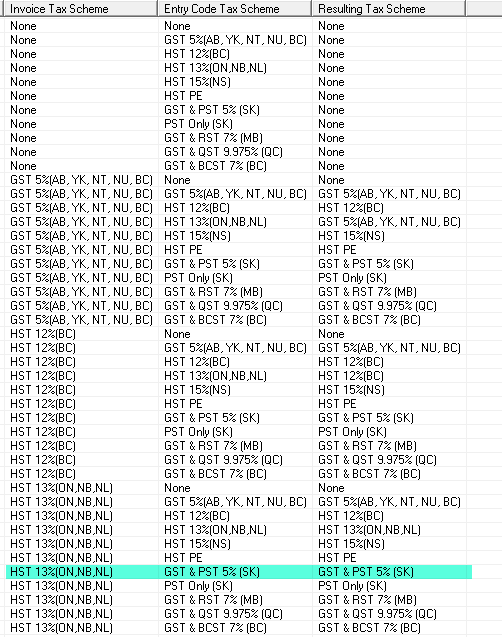
The sales matrix taxability results generated by Dexco, takes into consideration the following action points which are further detailed in APPENDIX I:
-
If the entry code's tax scheme is non-taxable or if the client invoice policy tax scheme is non-taxable, then the entry is non-taxable;
-
Else, if the entry code's tax scheme is equal to any of the tax scheme's assigned to the main client invoice policy of any of the firms in the system (if more than one), then the entry is taxable with the tax scheme of the invoice policy;
-
Else we have an absolute exception and we tax the entry with the tax scheme of the code.
-
In support of the above, the invoicing business process for the converting organization requires that:
-
The user be able to create invoices which include sales taxes as determined by the organization's interpretation of sales tax legislation;
-
The sales tax be calculated by the system and included on the invoice in a manner whereby the recipient would be able to manually calculate back the same amount with the information he or she sees on the physical or electronic format provide.
-
The sales tax billed can be reported on. All supporting reports must therefore balance to the accounted-for GL operations.
Note: It is possible for certain organizations not to agree with the Dexco-calculated result offered within the sales tax matrix, therefore the converting organization has the ability to modify the calculated outcome of the sales tax matrix table prior to implementation.
Example: The client invoice policy is HST 13% but the billing entity (firm) has the tax scheme for disbursement codes set as GST 5% & PST 5%. Where the client invoice policy is HST 13% and the entry code is GST 5% & PST 5%, the Dexco calculated sales tax matrix without modification would show a use-case of GST 5% & PST 5% when billing this disbursement entry.
Some firms in Saskatchewan would disagree with the calculated outcome and have therefore modified the result so that where the client invoice policy is HST 13% but the billing entity (firm) has the tax scheme for disbursement codes set as GST 5% & PST 5% the entry would be billed with a sales tax scheme equal to HST 13% & PST 5%.
The Sales Tax Billed Process:
The Client invoice policy with its supporting tax scheme is first assigned within the client properties form. This selection is then passed down to corresponding matters as they are opened and eventually to the invoices created for those same matters. Authorized users can override the client invoice policy throughout the process to reflect an accurate reflection of sales tax legislation for billing addresses outside of the province. In conclusion, the client invoice policy applied at any of the three applicable levels reflects a sales tax choice from a firm-defined list.
The client invoice policy contains the sales tax scheme - the combination of one or more tax rules. For example the HST 13% sales tax scheme would contain a single tax rule of HST at 13%; whereas the GST 5% and RST 7% tax scheme would contain two tax rules, namely GST at 5% and RST at 7%.
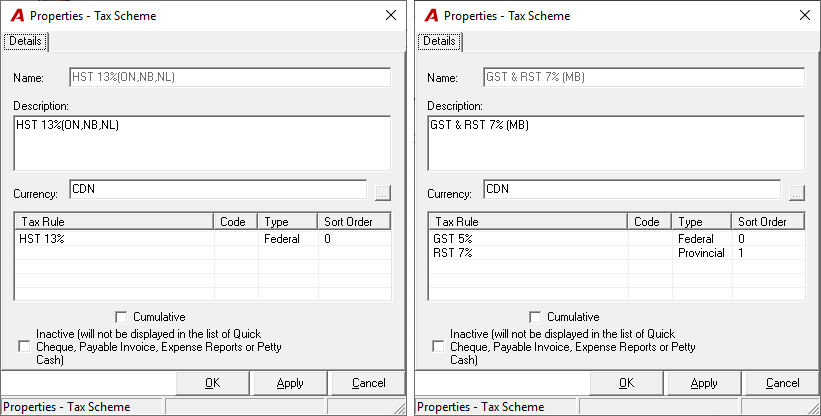
The invoice includes time and disbursement entries coded with time and disbursement codes also assigned a tax scheme. It is the resulting tax scheme of the entry code and client invoice policy scheme-combination as established by the sales tax matrix that determines the taxability of the entry, therefore a clear understanding of the requirements for time and disbursement codes sales tax scheme assignments across multiple sales tax jurisdictions is required.
Assigning the Sales Tax Scheme to a Code:
To facilitate the decision making process we offer three situations when considering the taxability of an entry code:
-
The good or service is non-taxable regardless of the taxability of the invoice. For example court documents are typically non-taxable even though the invoice is set as GST 5% only, thus other disbursements like photocopies as well as the time billed will in fact be subject to the sales tax. In this case the applicable time or disbursement code should be implemented with a tax scheme of Non Taxable;
-
The good or service follows the taxability of the invoice. In this case the time or disbursement code should be set with the tax scheme of the default client invoice policy of the main firm (firm 001) if more than one firm or office exists within your environment.
-
The good or service is neither non-taxable nor will it follow the taxability of the invoice. It is an exception. This is very rare but a possible scenario none-the-less; therefore in this case the time or disbursement code should be set with a tax scheme that does not equal that of the firm's default client invoice policy of any form within the environment.
Note to Reader: As of today our Canadian law-firm clients have not had such a situation.
Example:
-
Firm 1 is in Quebec with QST over GST as the default client invoice policy;
-
Firm 2 is in Ontario with HST 13% as the default client invoice policy;
-
Disbursement Code 1: Photocopies with QST over GST - tax scheme of default client invoice policy of the main firm (firm 001)
-
Disbursement Code 2: Court Documents – Non-Taxable
-
Disbursement Code 3: Exception Disbursement – GST 5%
-
Time Code 1: Blank content with QST over GST - tax scheme of default client invoice policy of the main firm (firm 001)
-
Time Code 2: Blank content - Non-Taxable
Case scenario 1: Invoice is created with HST 12% client invoice policy, then:
Disbursement Code 1 = Photocopies taxable at HST 12%
Disbursement Code 2 = Court Documents – Non-Taxable
Disbursement Code 3 = Exception Disbursement – GST 5%
Time Code 1 = Blank taxable at HST 12%
Time Code 2= Blank - Non-Taxable
Case scenario 2: Invoice is created with HST 13% client invoice policy, then:
Disbursement Code 1 = Photocopies taxable at HST 13%
Disbursement Code 2 = Court Documents – Non-Taxable
Disbursement Code 3 = Exception Disbursement – GST 5%
Time Code 1 = Blank taxable at HST 13%
Time Code 2= Blank - Non-Taxable
Case scenario: Invoice is created with a Non-Taxable client invoice policy, then:
Disbursement Code 1 = Photocopies – Non-Taxable
Disbursement Code 2 = Court Documents – Non-Taxable
Disbursement Code 3 = Exception Disbursement – Non-Taxable
Time Code 1 = Blank – Non-Taxable
Time Code 2= Blank - Non-Taxable
Appendix I
Calcultation of the Standard Sales Tax Table (Matrix)
The sales tax matrix is created for each environment based on the following variables:
-
The firm(s) default client invoice policies – depending on location some firms may differ in their default client invoice policies;
-
The time and disbursement code tax scheme. The time and disbursement tax schemes should be set in consideration of the location of the main firm (firm 001).
For example an organization with its main firm in SK would likely have:
-
Time codes set at GST 5%
-
Disbursement codes set at:
-
GST 5% and PST 5%, or;
-
Non-taxable
-
-
The list of client invoice policies included in the environment setting
The formula used to get the starting sales tax matrix result is:
-
If the "Entry Code Tax Scheme" is "Non Taxable" or the Client Invoice Policy's Tax Scheme is "Non Taxable" then result in the matrix is "Non Taxable"
Else
-
If the "Entry Code Tax Scheme" is the same as the Tax Scheme of the "Client Invoice Policy" then result is the Tax Scheme of the Client Invoice Policy
Else
-
If:
-
The "Entry Code Tax Scheme" is not the same as the "Client Invoice Policy's Tax Scheme", and;
-
The "Entry Code's Tax Scheme" is one of the Default "Client Invoice Policy's Tax Schemes from one the System's Firms (which is typically the main firm – 001), then the result is the "Client Invoice Policy's Tax Scheme"
Else
-
If:
-
The "Entry Code Tax Scheme" is not the same as the "Client Invoice Policy's Tax Scheme, and;
-
The "Entry Code's Tax Scheme" is NOT one of the Default "Client Invoice Policy's Tax Schemes from one the System's Firms (which is typically the main firm – 001), then result is the "Entry Code's Tax Scheme"
Else
-
Blank "Tax Scheme"