.png)
Overview
The sales tax engine is comprised of three separate components – one or more tax rules, a tax scheme and the client or vendor invoice policy.
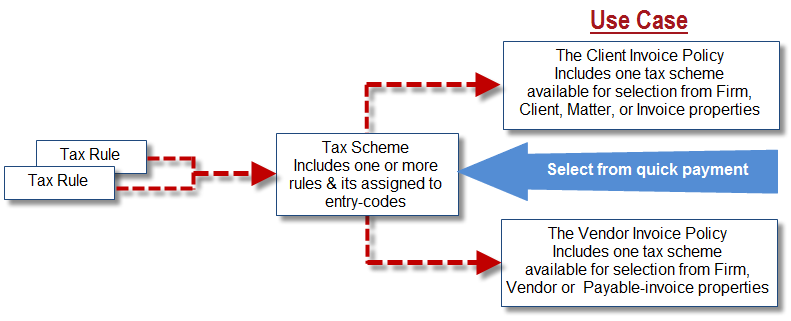
Sales tax rule is where the percentage of taxes to be charged per taxation level is specified. Sales-tax rules can be adjusted as needed by organizations when mandated by the federal and provincial governments and have a historical component.
Sales tax scheme is used to associate one or more tax rules per taxation level and are at the core of the sales-tax calculation model. The tax scheme can be visualized as engine or a vehicle to charge the relevant amount of taxes, and are especially important for provinces such as Quebec or Saskatchewan where separate provincial taxes are charged. Due to implications to the sales tax matrix, modifications to or creation of sales tax schemes must be completed by Dexco due to the implications to the sales tax matrix.
Client or vendor invoice policy is used to further define the sales tax scheme for ease of selection by the end-user. Client and vendor invoice policies can be created and modified by the organization.
IMPORTANT – Before Modifying a Tax Rate
Before proceeding with any tax rate modification, please ensure the following steps are completed:
-
Review the Tax Rule Usage
Identify where the tax rule is currently applied—specifically within:-
Tax Schemes
-
Client and Vendor Invoice Policies
-
-
Verify the Affected Jurisdictions
Ensure that the associated Tax Scheme and Client/Vendor Invoice Policies apply only to the tax jurisdiction(s) affected by the rate change. -
Determine the Scope of the Change
-
If the tax rule is part of a scheme or policy that applies to a single tax jurisdiction, and that jurisdiction requires a rate change — you may proceed with modifying the existing rule.
-
If the tax rule applies to multiple jurisdictions, and all of those jurisdictions require the same rate change — you may proceed with modifying the existing rule.
-
⚠️ If the tax rule applies to multiple jurisdictions, and only one or some of them require a rate change — do not modify the existing rule. In this case, you must:
-
Create new Client/Vendor Invoice Policies
-
Create a new Tax Scheme
-
Create a new Tax Rule with the updated rate
-
Update the Tax Matrix in Acumin accordingly
-
-
-
Contact Dexco for Assistance
Please note that only Dexco can perform the creation of new invoice policies, tax schemes, and tax rules.
To proceed, submit your request to:
📧 Support@dexco.com
Step-by-Step Instructions to Update a Tax Rule
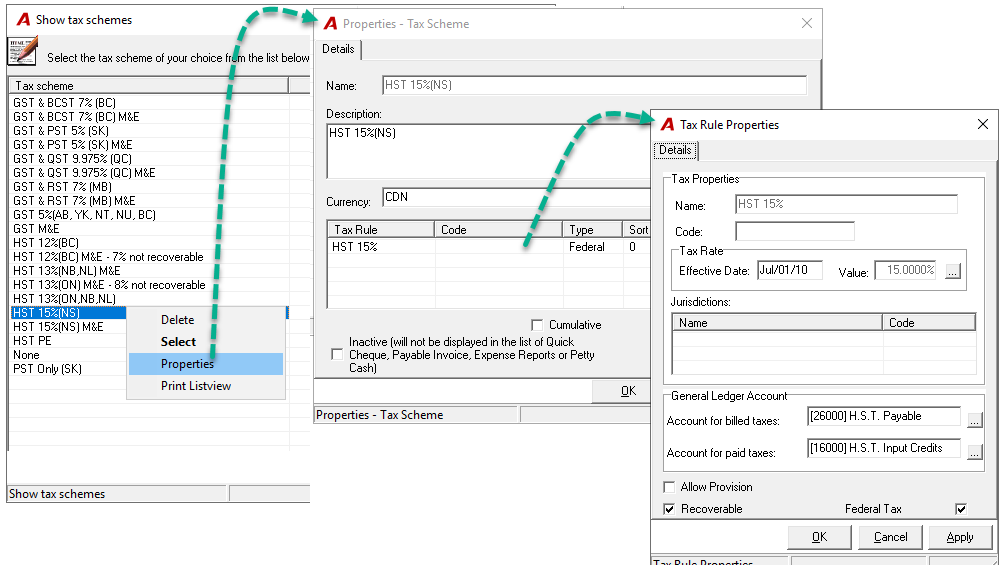
The tax scheme associated with the tax rule requiring modification currently applies only to a single tax jurisdiction—Nova Scotia (NS)."
-
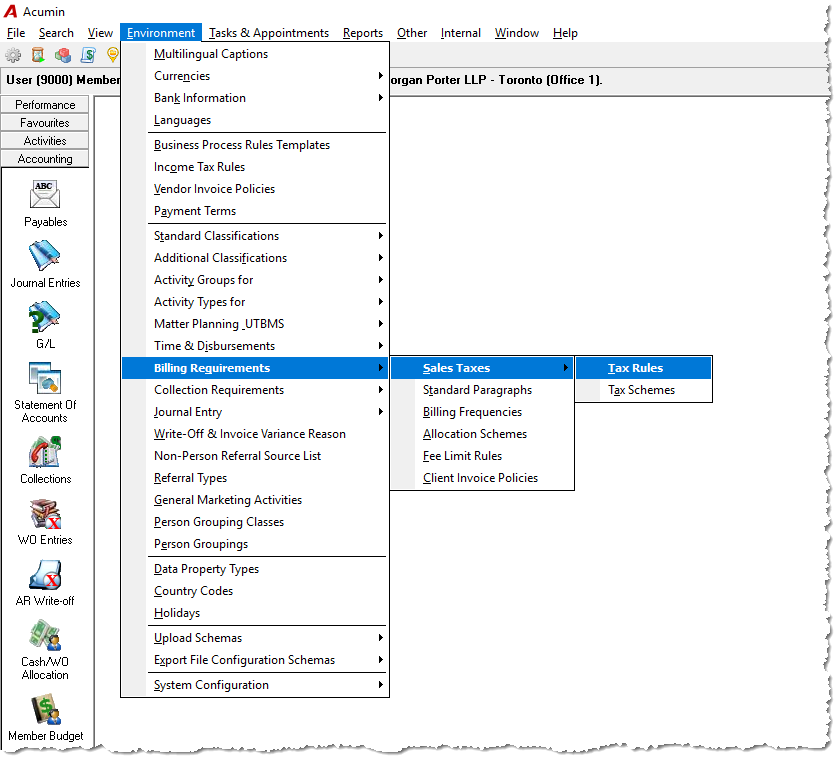
To access the tax rule, go to Environment – Billing Requirements – Sales Tax – Tax Rule
-
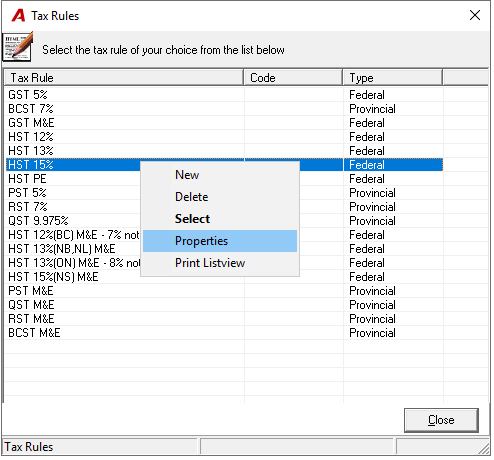
From all available tax rules, right-click and access the properties of the tax rule that requires modification.
-
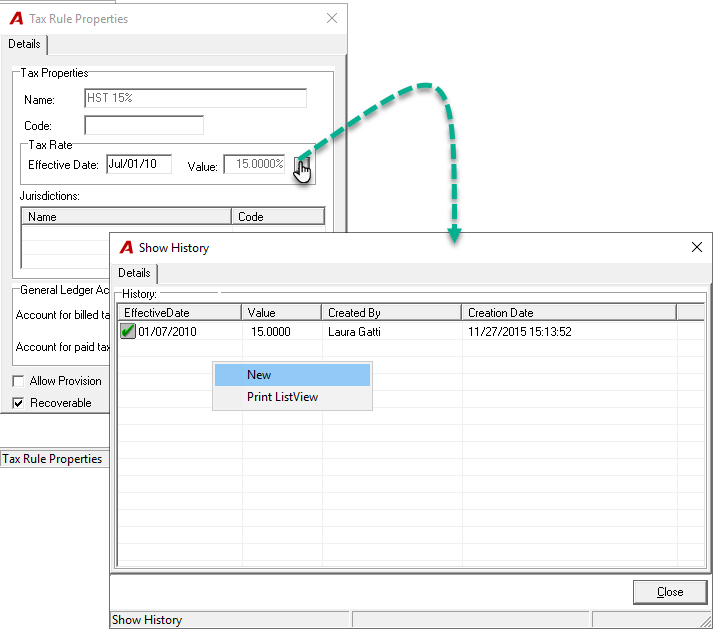
To adjust the value, click on the corresponding ellipsis button. The Show History form will launch with historical information for the tax rule.
-
To add a new value, right-click and select new.
-
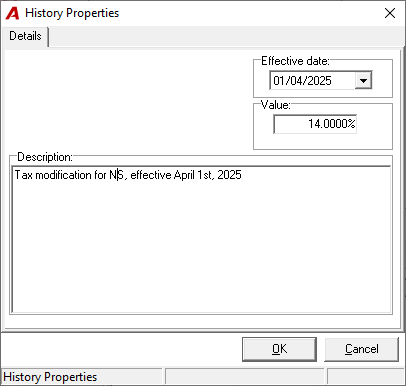
Enter an effective date. In the Value field, enter the percentage of sales tax to be charged and select OK.
-
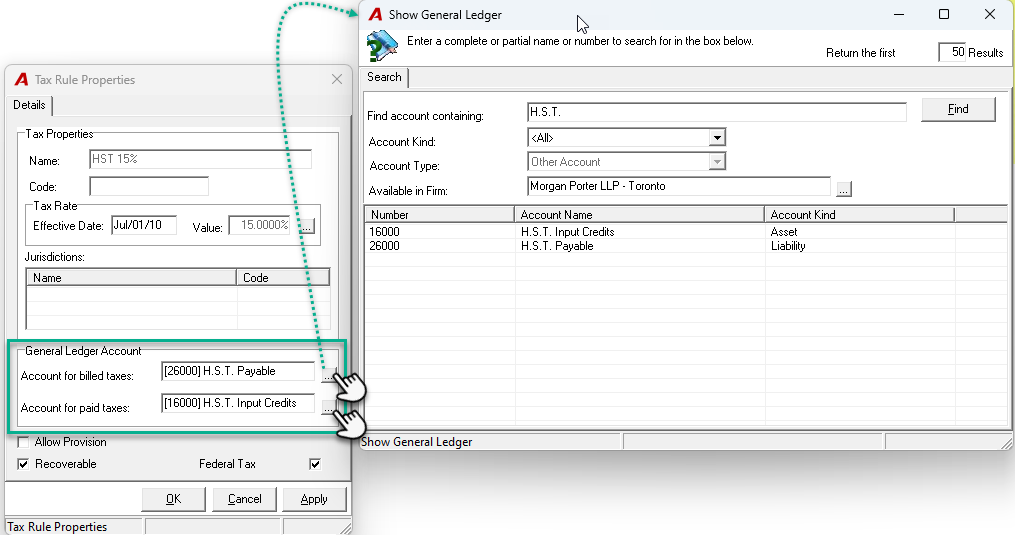
To change or select the GL accounts, click on the corresponding ellipsis button. In the Show General Ledger window, you will see a list of all available GL accounts for the firm. Browse or search through the list to locate the appropriate account. Select the desired GL account by clicking on it.
Responsibility of the Organization
It is important for the organization to understand that it is the responsibility of the authorized user to interpret sales tax legislation and consequently apply the correct sales tax when invoicing clients or when paying suppliers. This means that the sales tax schemes and tax rules implemented along with the resulting outcome of the sales tax matrix are based on a submitted list of client-approved client and vendor invoice policies as well as a subsequently client-approved sales tax calculation matrix. Subsequent modifications to tax schemes or the sales tax matrix are considered a chargeable service.
Responsibility of Dexco
-
Ensuring that the tools included enable users to invoice their clients and process supplier invoices in accordance with place of supply rules.
Responsibility of The Organization
-
Understanding legislation as it applies to them;
-
Obtaining tax advice from professionals as needed.